


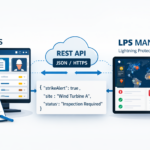
How to connect your CMMS to the Lightning Management software via REST API
The interconnection of industrial systems has become the cornerstone of modern operational efficiency. In a context where the security of critical infrastructure allows for no compromise, connecting your CMMS (Computerized Maintenance Management System) to a specialized solution such as lightning management software via a REST API is no longer optional. It is a strategic necessity. This approach breaks down data silos, automates maintenance processes, and ensures immediate responsiveness to weather events. This article details the technical methodology, quantifiable benefits, and concrete steps for successful integration, drawing on the expertise of LPS Manager.
Understanding integration: CMMS, Lightning Management Software, and REST API
The industrial maintenance ecosystem today relies on the ability of different software programs to communicate seamlessly and securely. Integration via API (Application Programming Interface) is the technical standard enabling this interoperability. LPS Manager significantly facilitates this integration thanks to its native REST API, specifically designed to exchange critical lightning protection data with third-party systems without any technical friction.
What is a CMMS and its role in maintenance?
A CMMS, or Computerized Maintenance Management System, is the central nervous system for maintenance . Its role is to centralize information to optimize the use, availability, and lifespan of physical equipment. Machines, communication infrastructure, vehicle fleets, production facilities: everything is included.
In a modern industrial environment, the CMMS is no longer simply an inventory register. It acts as a true operations driver:
-
Work order (WO) management: It automates the creation, assignment and tracking of maintenance tasks.
-
Asset tracking: It maintains a complete history of interventions, costs and performance for each piece of equipment.
-
Inventory management: It ensures the availability of spare parts (MRO) to minimize downtime.
Industry statistics show that the effective implementation of a CMMS can reduce maintenance costs by 15 to 20%. Equipment availability increases by 10 to 30%. However, a general-purpose CMMS, however powerful (such as SAP PM or IBM Maximo), often lacks the granularity needed to manage highly specialized areas like lightning protection. This is where integration with business software becomes crucial. The CMMS needs precise external data to trigger the right actions at the right time.
Lightning management software: your smart digital shield
Lightning risk management requires specialized technical expertise and strict adherence to evolving standards. Lightning management software is not simply an add-on module. It is a dedicated solution that models, monitors, and analyzes the effectiveness of protection systems (lightning rods, surge arresters , grounding systems).
LPS Manager positions itself as the complete French solution for digital lightning protection. Unlike fragmented tools, this platform offers a holistic approach:
-
Calculation and simulation : Verification of the required level of protection according to the lightning risk analysis (ARF).
-
Technical inventory: Precise mapping of lightning protection installations (IPF) and surge protection devices.
-
Meteorological monitoring : Correlation between actual storm events and the state of installations.
The added value of such software lies in its ability to transform raw data into actionable information. For example, knowing that a 100 kA lightning strike hit a specific area allows you to immediately deduce which equipment is at risk. By digitizing these processes, LPS Manager replaces paper binders and outdated Excel files. This provides you with a single source of truth for everything related to lightning protection at your sites.
The REST API: the technical bridge between your systems
For the CMMS and the Lightning Management software to collaborate, they must speak the same language. This is the role of the REST (Representational State Transfer) API. An API is a set of definitions and protocols that allows two applications to communicate. The REST architecture is now the industry standard for web services due to its flexibility, lightweight nature, and scalability.
Technically, a REST API works via standard HTTP requests, the same as those used by web browsers:
-
GET: To retrieve data (e.g., to obtain the list of lightning rods requiring verification).
-
POST: To send new data (e.g., create a new maintenance order in the CMMS following a lightning alert).
-
PUT/PATCH: To update existing information.
-
DELETE: To delete data.
Data exchange is generally done in JSON (JavaScript Object Notation) format, which is lightweight and readable by both machines and humans. The major advantage of a REST API for CMMS integration is its platform independence. Whether your CMMS is hosted in the cloud (SaaS) or on-premises, and whether it is developed in Java, .NET, or Python, it can interact with the LPS Manager modular architectures where each software excels in its specific area while contributing to the overall intelligence of the information system.
Why connect your CMMS to lightning management software?
The convergence between comprehensive maintenance management and specialized lightning protection generates powerful operational synergies. This connection goes beyond mere IT convenience; it addresses imperatives of security, cost-effectiveness, and legal compliance.
Optimize your preventive and corrective maintenance
API integration transforms the maintenance of your lightning protection systems. It shifts your approach from a rigid schedule to a conditional and predictive . Traditionally, checks are performed at fixed intervals, often without considering the actual stresses experienced by the installation.
lightning event data captured by the specialized software is instantly transmitted to the CMMS.
-
Event-triggered corrective maintenance: If a lightning strike is detected at a site, the API can automatically generate a work order (WO) in the CMMS for immediate visual inspection. This reduces the latency between the incident and its response, minimizing the risk of cascading failures.
-
Adjusted preventive maintenance: Aging or wear data (such as changes in grounding resistance) collected via the API allows for adjustments to maintenance plans within the CMMS. If a value deviates dangerously, intervention is scheduled before a failure occurs.
Here is a comparison of the operational impact:
|
Criteria |
Manual management (without API) |
Integrated management (with API) |
|---|---|---|
|
Triggering |
Based on the schedule or after a breakdown has been detected |
Based on the actual event or data threshold |
|
Response time |
Several days to several weeks |
Near-instantaneous (real-time) |
|
Precision |
Depends on the human operator |
Based on metrological data |
|
Cost |
High (unnecessary visits or undetected faults) |
Optimized (targeted interventions) |
Improve traceability and compliance (NF C 17-102:2011, IEC 62305:2024)
Regulatory compliance is a major issue for operators of industrial sites, particularly those classified for environmental protection (ICPE). Current standards, such as NF C 17-102:2011 for Early Streamer Emission (ESE) lightning rods and the IEC 62305:2024 series for conventional installations, mandate periodic inspections as well as checks after each lightning strike.
LPS Manager automatically ensures compliance with required European standards by calculating deadlines and defining the necessary verifications. By connecting this system to your CMMS:
-
Irrefutable audit proof: Every data exchange is logged. You can prove that a lightning alert did indeed generate a service request and that this request was closed.
-
Meeting deadlines: The API synchronizes regulatory verification dates. The CMMS cannot "forget" a deadline because it is pushed by the LPS Manager .
-
Centralized documentation: Verification reports and certificates of conformity can be linked directly to the asset in the CMMS, facilitating audits by insurers or regulatory authorities.
Reduce errors and improve operational efficiency
Double data entry is the enemy of data reliability. When a technician has to enter ground measurement results into lightning protection software and then manually transfer that information to the CMMS, the risk of typos or transposed digits is high. Studies show that the average error rate for manual data entry is between 1% and 4%. Across thousands of monitoring points, this represents a significant amount of corrupted data.
Automation via API eliminates this risk:
-
Data integrity: The value measured by the connected device or entered in the LPS Manager is transmitted bit for bit to the CMMS.
-
Administrative time savings: Maintenance teams no longer have to spend hours synchronizing disparate databases. This time can be reallocated to higher value-added tasks, such as technical analysis or process optimization.
-
Standardization: The API enforces the use of a standardized data format, avoiding vague or unstructured descriptions in work orders.
Make informed decisions with increased responsiveness
In an industrial environment, the speed of information determines the quality of decision-making. In the event of a severe storm, a site manager must know immediately whether their facilities are still protected or if they have suffered critical damage requiring a safety shutdown of production.
API integration allows you to feed decision-making dashboards in the CMMS or a BI (Business Intelligence) tool with lightning-fast, real-time data.
-
Global visibility: Overlay weather data with production data.
-
Correlation analysis: Identify whether unexplained failures on PLCs or electronic equipment coincide with recorded lightning events, even of low intensity.
-
Prioritization: In the event of multiple incidents, the algorithm can help prioritize interventions in the most critical or most affected areas, thus optimizing the deployment of teams in the field.
The API integration process: from design to deployment
Successfully integrating a CMMS with lightning management software requires careful planning and execution. It's a technical project that must follow a rigorous methodology to ensure the solution's robustness, security, and maintainability. Here are the key steps for a successful deployment.
Analyze your needs and map data flows
Before writing a single line of code, define the functional scope of the integration. What are the priority use cases? Precisely identify what data needs to be transferred and in which direction (unidirectional or bidirectional).
Here is a typical list of data flows to map:
-
Stream 1 (LPS to CMMS): Lightning event alerts (Date, Time, Amplitude, GPS location ).
-
Flow 2 (LPS to CMMS): Regulatory verification reminders (Due date, Verification type, Applicable standard).
-
Flow 3 (LPS to CMMS): Non-conformities detected (Description of defect, Photo, Severity level).
-
Flow 4 (CMMS to LPS): Intervention status (Planned, In progress, Completed) to update the installation status in the lightning software.
For each data stream, define the synchronization frequency (real-time via webhooks or hourly batch) and the expected data volume. This specification step should involve maintenance managers and IT teams.
Choose the integration solution and tools that suit you
The technical architecture of the integration depends on your existing environment. Several approaches are possible:
-
Point-to-Point Integration: The CMMS directly calls the LPS Manager . This is the simplest and fastest method for lightweight integrations.
-
Middleware / ESB (Enterprise Service Bus): Use of an integration platform (such as MuleSoft, Tibco, or Talend) to orchestrate data exchange. Recommended for large enterprises with complex ecosystems.
-
Custom scripts: Development of scripts (Python, Node.js) hosted on an internal server that query the API and push data into the CMMS.
The essential tools for this phase include:
-
Postman or Insomnia: To manually test API endpoints, inspect JSON responses and validate authentication mechanisms.
-
Swagger / OpenAPI: To view the interactive API documentation and automatically generate code clients (SDK).
Develop, test, and deploy your integration step by step
Development should follow an iterative approach. Start with a "Proof of Concept" (POC) on a simple , such as retrieving the list of sites.
Development Phase:
-
Implement authentication (usually via Token Bearer or API Key).
-
Manage the pagination of the results if you are retrieving large lists of equipment.
-
Map the fields: Make sure that the "Date_Installation" field in LPS Manager matches the format expected by the "Install_Date" field in your CMMS (e.g., ISO 8601 YYYY-MM-DD).
Testing Phase (Staging):
Never test directly in production. Use a "Sandbox" environment.
-
Unit tests: Verify that each function returns the expected result.
-
Edge case tests: What happens if the "Description" field contains special characters? What happens if the connection is lost?
-
Error simulation: Check how your system reacts to HTTP error codes (401 Unauthorized, 404 Not Found, 429 Too Many Requests, 500 Internal Server Error).
Deployment :
Once the tests are validated, deploy the connector to production. Proceed with a phased rollout, for example site by site, to monitor the system's behavior.
Secure and maintain your API for optimal performance
Security is non-negotiable, especially when dealing with critical systems.
-
Encryption: All communications must be made via HTTPS (TLS 1.2 or 1.3) to guarantee the confidentiality of data in transit.
-
Secret management: Never store API keys or passwords in plain text in the source code. Use environment variables or vault managers.
-
Rate Limiting: Respect the request limits imposed by the API to avoid being blocked for unintentional "denial of service".
Maintenance also involves monitoring. Set up alerts if the connector fails to synchronize data for longer than a certain period. Error logs should be clear to allow for quick diagnosis. Also, stay informed about API updates (versioning) to anticipate changes that could impact your integration (e.g., moving from v1 to v2).
Key data synchronized for effective lightning management
The effectiveness of integration lies in the relevance of the data exchanged. It's not about synchronizing everything, but about targeting the information that generates operational value. Here are the four key data pillars to prioritize for integration.
Automate the management of interventions and maintenance
The core of the integration is the automatic creation of Work Orders (WOs).
-
Data sources: Storm alert, exceeding of earth resistance threshold, regulatory deadline.
-
Target data in the CMMS: Creating a ticket with:
-
Title: "Lightning Check – Site [Name] – Following event [Date]"
-
Priority: High / Critical (depending on intensity).
-
Description: Technical details provided by the API (e.g., "Impact detected on lightning rod #3, amplitude 45kA").
-
Location: Precise GPS coordinates of the equipment.
-
This automation reduces the mean time to repair (MTTR – Mean Time To Repair) by eliminating the administrative steps of ticket creation.
Track non-conformities and alerts in real time
Reporting non-conformities is essential for safety. When an auditor or technician reports a fault via the LPS Manager mobile application (e.g., severed down conductor, defective lightning strike counter), this information must be immediately visible in the CMMS.
-
Status synchronization:
-
Status "Critical" in LPS Manager -> Status "To be repaired immediately" in the CMMS.
-
State "Observation" -> Status "To be monitored".
-
-
Media enrichment: If the API allows it, transfer links to photos of the defects taken in the field. A picture is worth a thousand words for the maintenance planner who needs to order spare parts before the intervention.
Plan and schedule your regulatory checks
Managing regulatory calendars is complex because it depends on multiple factors: level of protection (Level I to IV), nature of the site (ICPE, ERP), and history of events.
The integration allows the dynamic calendar of LPS Manager to be synchronized with the CMMS planner.
-
Algorithm: If the IEC 62305 standard requires a visual check every year and a full check every 2 years for a protection level I, these dates are calculated by LPS Manager .
-
Projection: The CMMS receives these future dates and reserves the resources (technicians, platforms) in advance. This allows for a smoother workload and avoids bottlenecks at the end of the year.
Centralize the complete history of lightning events
The history log is the memory of your installation. It is crucial for post-incident analysis and for insurance purposes.
-
Event data: Each detected lightning strike (date, time, amplitude, polarity) is archived in the equipment's life record within the CMMS.
-
Correlation of failures: By cross-referencing this history with the failures of sensitive electronic equipment (PLCs, servers, drives), you can identify weaknesses in your surge protection (undersized or poorly coordinated surge arresters).
-
Reporting: This consolidated data allows for the generation of annual lightning protection performance reports, justifying the investments made to management.
LPS Manager : the API integration solution for intelligent lightning management
Choosing the right technology partner is crucial. LPS Manager doesn't just provide software, but offers an open architecture designed for interoperability within Industry 4.0.
Discover the LPS Manager REST API
The LPS Manager API was designed by developers for developers, with a constant focus on clarity and performance. It is based on a strict RESTful architecture, ensuring a quick learning curve.
Key technical specifications:
-
Format: JSON (UTF-8).
-
Protocol: HTTPS required (TLS security).
-
Authentication: Based on secure tokens, allowing fine-grained management of access rights (read only, write, admin).
-
Documentation: Comprehensive and interactive documentation is available to guide your technical teams.
To view the available endpoints and understand the structure of the data objects (Installations, Events, Audits), please refer to the official documentation: lpsmanager.io/en/api/ . This resource is an essential starting point for your IT team.
Benefit from compatibility with leading CMMS (SAP PM, IBM Maximo, Infor EAM)
LPS Manager integrates natively with the most popular CMMS platforms on the market. This native compatibility means that the data structures have been designed to align with the standards of these ERP giants.
-
SAP PM (Plant Maintenance): LPS Manager installation folders . SAP notifications can be triggered directly by API alerts.
-
IBM Maximo: Asset and work order management in Maximo benefits from enhanced lightning data. The API facilitates the population of meters in Maximo for conditional monitoring.
-
Infor EAM: The flexibility of Infor coupled with the precision of LPS Manager enables automated regulatory compliance management, reducing legal risks for the company.
This predisposition for integration significantly reduces specific development costs and accelerates the return on investment (ROI) of the project.
Take advantage of the advanced features and added value of integration
Beyond simple data synchronization, integration unlocks advanced features that transform risk management.
-
Document sharing: Automatically synchronize PDF audit reports generated by LPS Manager to your CMMS document management system (DMS).
-
Multi-site management: For large groups, the API allows data from hundreds of geographically dispersed sites to be aggregated into a single dashboard within the central CMMS.
-
Smart notifications: Configure complex workflows. For example: "If an impact > 100kA is detected, send an SMS to the site manager AND create a critical ticket in the CMMS."
To discover all the features available through integration, visit: lpsmanager.io/en/features/ .
Complete your installation with LPSFR products (Contact@ir, Rout@ir)
Software efficiency is multiplied tenfold when coupled with high-performance IoT hardware. LPS Manager interfaces seamlessly with LPSFR hardware solutions.
-
Contact@ir : This system allows any existing lightning rod to communicate. It transmits lightning alerts in real time to the LPS Manager , which then relays them to your CMMS via the API.
-
Rout@ir: It ensures the transmission of data in a secure and autonomous manner.
Combining these IoT sensors with the analytical power of LPS Manager and the organizational strength of your CMMS creates a complete protection chain, from the physical sensor to the maintenance order. Find these complementary solutions at Contact@ir System on lpsfr.com .
Best practices for successful and sustainable API integration
Technical integration is just the tip of the iceberg. For the project to deliver long-term value, adopt a data and process governance approach.
Define a clear strategy with measurable objectives
Don't just connect for the sake of connecting. Define KPIs (Key Performance Indicators) before launching the project.
-
Target response time: "Reduce the time between a lightning strike and inspection from 48 hours to 4 hours."
-
Compliance objective: "Achieve 100% completion of regulatory checks within the allotted timeframes."
-
Efficiency objective: "Reduce the administrative data entry time for audit reports by 90%."
These metrics will allow you to measure the success of the integration and justify the resources allocated.
Ensure the quality and integrity of your exchanged data
The "Garbage In, Garbage Out" rule applies perfectly here. If the data in LPS Manager is incomplete or if the equipment repository in the CMMS is outdated, the integration will fail.
-
Preliminary cleanup: Before integration, audit your databases. Ensure that each site and each piece of equipment has a unique identifier common to both systems.
-
Data validation: Configure the API to reject inconsistent data (e.g., a verification date earlier than the installation date).
-
Duplicate management: Implement strict rules to avoid creating duplicate equipment during synchronization.
Effectively manage the evolution and scalability of your API
Software evolves. Your CMMS will be updated, and LPS Manager will enrich its API with new features.
-
Versioning: Always use a specific API version in your calls (e.g., /v1/installations). Do not point to a "latest" version, which could change without notice and break your connector.
-
Scalability: Design your integration to handle increased load. If you add 50 new sites next year, your import script must be able to handle this additional volume without crashing.
-
Internal documentation: Document your integration code. If the developer who created the script leaves the company, their successor must be able to understand how data flows between LPS Manager and the CMMS.
Conclusion: API integration is an essential investment for the security and efficiency of your systems
Connecting your CMMS to lightning management software via a REST API is much more than a technical upgrade. It's a lever for operational performance and security. By automating information flows, you guarantee seamless compliance with NF C 17-102 and IEC 62305 standards. You reduce costs associated with administrative inefficiencies. And above all, you ensure optimal protection of your facilities and personnel through real-time responsiveness.
LPS Manager, with its native API and industry expertise, is the ideal partner for a successful digital transformation. Stop leaving your lightning protection data isolated in a silo. Put it to work for your overall maintenance.
To start your integration project and discuss your specific needs with our experts, contact LPS Manager today via lpsmanager.io/en/contact/ .
Frequently Asked Questions
What is the best programming software for APIs?
There is no single "best" software, but Postman is the go-to tool for testing and developing APIs. For writing integration code, environments like Visual Studio Code (with languages like Python or Node.js) are very popular.
What does CMMS mean?
CMMS is the English acronym for Computerized Maintenance Management System GMAO is used . It is software designed to centralize maintenance information and facilitate equipment maintenance processes.
How does API integration improve regulatory compliance?
API integration automates the tracking of verification deadlines imposed by standards (such as IEC 62305). It ensures that each lightning event triggers the required inspections and archives evidence of intervention, guaranteeing complete and tamper-proof traceability for audits.
What are the main challenges of integrating APIs into a CMMS?
The major challenges include data quality (cleaning and matching identifiers between systems), the security of exchanges (authentication, encryption) and the maintenance of the connector in the face of software updates on both platforms.
Ready to connect your CMMS to LPS Manager ?
Every integration project is unique. LPS Manager offers tailor-made solutions adapted to your IT infrastructure, whether it's SAP PM, IBM Maximo, Infor EAM or Dimo Maint.
Discover our offers LPS Manager pricing page , or contact our team to assess integration with your existing system. Our technical team supports every deployment, from defining requirements to going live.
For IT teams and developers, also consult the dedicated IT team page for the technical specifications of the LPS Manager .
